Self-slack-shaming
2026-02-01 · data visualization

I try to leverage power of shame to improve myself. I believe this is a healthy and balanced way to approach better habits /s.
In practice, this means I have various indicators and mini-viz-thingamabobs on my laptop & phone reminding me to curb my appetite for bad digital habits. Last September I set up one for Slack.
Slack is one of those necessary evils nowadays. Given I (try to) abstain from social media at large, my monkey brain sees Slack as a great substitute source for similar dopamine hits. Furthermore, I have moderate obsessive compulsions to stay in the loop on every subproject at work (even ones that don’t directly concern me) Keeping Slack (and other work stuff) off my phone is easy enough but on laptop, the keyboard shortcut and applet with a red/blue circle are too much of a temptation. To try and better myself i.e. reduce Slack-lurking, I set up a logger, dwm status block and gnuplot for the logged data.
Detecting shame
I almost always forget to completely close Slack so it is usually running in the background.
Consequently, we can’t just ps aux & grep it to measure usage time.
Here, I made the logging script use xdotool to see what window is in focus.
There is some additional logic to check the laptop is not locked or anything.
#!/bin/bash

# Directory and log setup
LOGDIR="$HOME/.local/share/slack-usage"
mkdir -p "$LOGDIR"
LOGFILE="$LOGDIR/$(date '+%Y-%m-%d').log"

# If the log exists, read the current value; else start at 0
if [ -f "$LOGFILE" ]; then
    SECONDS_SLACK=$(<"$LOGFILE")
else
    SECONDS_SLACK=0
fi

INTERVAL=10  # seconds between checks
IDLE_THRESHOLD=$((3 * 60 * 1000)) # 3 minutes in ms

while true; do
    # Detect idle time using xprintidle (outputs ms since last input)
    IDLE_MS=$(xprintidle 2>/dev/null || echo 0)

    # Detect if screen is locked (common with gnome-screensaver or similar)
    SCREEN_LOCKED=false
    if loginctl show-session "$XDG_SESSION_ID" -p LockedHint 2>/dev/null | grep -q "yes"; then
        SCREEN_LOCKED=true
    fi

    # Only count if not locked and user is active
    if [ "$SCREEN_LOCKED" = false ] && [ "$IDLE_MS" -lt "$IDLE_THRESHOLD" ]; then
        WIN_ID=$(xdotool getwindowfocus 2>/dev/null)
        if [ -n "$WIN_ID" ]; then
            WIN_CLASS=$(xprop -id "$WIN_ID" WM_CLASS 2>/dev/null | awk -F '"' '{print $4}')
            if [[ "$WIN_CLASS" == "Slack" ]]; then
                SECONDS_SLACK=$((SECONDS_SLACK + INTERVAL))
            fi
        fi
    fi

    # Overwrite the log so it's always up to date
    echo "$SECONDS_SLACK" > "$LOGFILE"

    sleep "$INTERVAL"
done
Showing the shame
The indicator is a dwm block script. I use dwmblocks (originally based on this IIRC) so i can also change the color of the indicator when it exceeds a threshold (60 min for me). It is right next to a task-block with taskwarrior task so I can glance directly to see what I am supposed to be doing.
#!/bin/sh

slack_time=$(awk '{print int($1/60 + 0.5)}' ~/.local/share/slack-usage/$(date '+%Y-%m-%d').log)

if [ "$slack_time" -gt 60 ]; then
    # ^b#840e30^ sets red background, ^d^ resets it
    echo -ne "^b#840e30^  $slack_time ^d^"
else
    echo -ne "  $slack_time"
fi
Apropos, the task block:
#! /bin/bash

# Shows tasks completed / planned for this week
truncate_string() {
    if [ ${#1} -gt 40 ]; then
        echo "${1:0:37}..."
    else
        echo "$1"
    fi
}


n_overdue_tasks=$(task +OVERDUE export | jq 'length')
n_tasks_due=$(task status:pending due.before:sunday count)
n_tasks_done=$(task status:completed end.after:sunday-7d count)


if [ "$n_overdue_tasks" -gt 0 ]; then
    task_numbers=$(printf "%s/%s" "$n_tasks_done" "$(($n_tasks_due+$n_tasks_done))" )
else
    task_numbers=$(printf "%s/%s" "$n_tasks_done" "$(($n_tasks_due+$n_tasks_done))" )
fi

n_active_tasks="$(task +ACTIVE export | jq 'length')"
highest_prio_task="$(task status:pending export | jq -r 'max_by(.urgency) | "\(.project):\(.description)"')"

if [ "$n_active_tasks" -ne 0 ]; then
    top_task="$(task +ACTIVE export | jq -r 'max_by(.urgency) | "\(.project):\(.description)"')"
else
    top_task=$highest_prio_task
fi

truncated_task=$(truncate_string "$top_task")
echo -ne "^b#282c34^$truncated_task • $task_numbers^d^"
looks something like this (with 4 minutes on the clock)

Plotting all the shame
So after running this a while, we have a folder full of log files.
To plot those, I use gnuplot. By default it plots the current week, with -a you get everything.
#!/bin/bash
LOGDIR="$HOME/.local/share/slack-usage"
DATAFILE=$(mktemp)
TICSFILE=$(mktemp)
TICS2FILE=$(mktemp)
# Detect OS type for date command
if date --version >/dev/null 2>&1; then
GNU_DATE=true
else
GNU_DATE=false
fi
# Check for --all / -a argument
PLOT_ALL=false
if [[ "$1" == "--all" || "$1" == "-a" ]]; then
PLOT_ALL=true
fi
# Dynamic font sizing and offsets
if $PLOT_ALL; then
XTICS_FONT=",8"
YLABEL_FONT=",12"
XTICS_OFFSET="-2.0,-2.5"
BMARGIN=5
else
XTICS_FONT=",14"
YLABEL_FONT=",14"
XTICS_OFFSET="-6.0,-3.0"
BMARGIN=5
fi
# Helper function to get day of week (1=Monday, 7=Sunday)
get_dow() {
if $GNU_DATE; then
date -d "$1" "+%u"
else
date -j -f "%Y-%m-%d" "$1" "+%u"
fi
}
# Helper function to get dd.MM format
get_ddmm() {
if $GNU_DATE; then
date -d "$1" "+%d.%m"
else
date -j -f "%Y-%m-%d" "$1" "+%d.%m"
fi
}
# Helper function to get dd.MM.yy format
get_ddmmyy() {
if $GNU_DATE; then
date -d "$1" "+%d.%m.%y"
else
date -j -f "%Y-%m-%d" "$1" "+%d.%m.%y"
fi
}
# Helper function to get ISO week number
get_weeknum() {
if $GNU_DATE; then
date -d "$1" "+%V"
else
date -j -f "%Y-%m-%d" "$1" "+%V"
fi
}
# Helper function to get abbreviated month + year (e.g. "Jan 25")
get_mon_year() {
if $GNU_DATE; then
date -d "$1" "+%b %y"
else
date -j -f "%Y-%m-%d" "$1" "+%b %y"
fi
}
# Helper function to add days
add_days() {
local date_str="$1"
local days="$2"
if $GNU_DATE; then
date -d "$date_str +$days days" "+%Y-%m-%d"
else
date -j -v+"${days}"d -f "%Y-%m-%d" "$date_str" "+%Y-%m-%d"
fi
}
# Determine date range
if $PLOT_ALL; then
START_DATE=$(ls "$LOGDIR"/*.log 2>/dev/null | sort | head -n1 | xargs -n1 basename | sed 's/\.log$//')
END_DATE=$(ls "$LOGDIR"/*.log 2>/dev/null | sort | tail -n1 | xargs -n1 basename | sed 's/\.log$//')
else
if [[ $(get_dow $(date "+%Y-%m-%d")) -eq 1 ]]; then
MON=$(date "+%Y-%m-%d")
else
if $GNU_DATE; then
MON=$(date -d "last monday" "+%Y-%m-%d")
else
MON=$(date -v-mon "+%Y-%m-%d")
fi
fi
if $GNU_DATE; then
SUN=$(date -d "next sunday" "+%Y-%m-%d")
else
SUN=$(date -v+sun "+%Y-%m-%d")
fi
START_DATE="$MON"
END_DATE="$SUN"
fi
CURRENT_DATE="$START_DATE"
DAY_INDEX=0
if $PLOT_ALL; then
# Collect all daily data and track week boundaries
declare -a all_dates
declare -A day_values
while [[ "$CURRENT_DATE" < "$END_DATE" || "$CURRENT_DATE" == "$END_DATE" ]]; do
FILE="$LOGDIR/$CURRENT_DATE.log"
if [[ -f "$FILE" ]]; then
s=$(cat "$FILE")
else
s=0
fi
m=$((s/60))
all_dates+=("$CURRENT_DATE")
day_values["$CURRENT_DATE"]=$m
CURRENT_DATE=$(add_days "$CURRENT_DATE" 1)
done
# Output daily data (bars) - just index and value, no xtic labels
for i in "${!all_dates[@]}"; do
date="${all_dates[$i]}"
echo "$i ${day_values["$date"]}"
done > "$DATAFILE"
# Compute average ± stddev of non-zero days
STATS=$(awk '
$2 > 0 { sum += $2; sumsq += $2*$2; n++ }
END {
if (n > 0) {
avg = sum / n;
var = sumsq / n - avg * avg;
if (var < 0) var = 0;
sd = sqrt(var);
printf "μ=%.0f σ=%.0f", avg, sd
} else { printf "μ=0 σ=0" }
}' "$DATAFILE")
TITLE=" usage in minutes (${STATS})"
# Generate week number labels (row 1) and month/year labels (row 2)
last_index=$((${#all_dates[@]} - 1))
prev_mon_year=""
for i in "${!all_dates[@]}"; do
date="${all_dates[$i]}"
dow=$(get_dow "$date")
# Week number tick at center of each week (Monday found, center = +3)
if [[ "$dow" -eq 1 ]]; then
center_idx=$((i + 3))
if [[ $center_idx -gt $last_index ]]; then
center_idx=$last_index
fi
weeknum=$(get_weeknum "$date")
echo "set xtics add (\"$weeknum\" $center_idx)"
fi
# Month/year label: place at first occurrence of each new month
mon_year=$(get_mon_year "$date")
if [[ "$mon_year" != "$prev_mon_year" ]]; then
# Find end of this month to center the label
month_start_idx=$i
month_end_idx=$i
for j in $(seq $((i+1)) $last_index); do
j_mon_year=$(get_mon_year "${all_dates[$j]}")
if [[ "$j_mon_year" == "$mon_year" ]]; then
month_end_idx=$j
else
break
fi
done
month_center_idx=$(( (month_start_idx + month_end_idx) / 2 ))
echo "set label \"$mon_year\" at first $month_center_idx, character 2.6 center font \",9\""
prev_mon_year="$mon_year"
fi
done > "$TICSFILE"
# Split into separate files
grep "^set xtics" "$TICSFILE" > "${TICSFILE}.x"
grep "^set label" "$TICSFILE" > "${TICS2FILE}"
mv "${TICSFILE}.x" "$TICSFILE"
else
# Daily view for week mode
while [[ "$CURRENT_DATE" < "$END_DATE" || "$CURRENT_DATE" == "$END_DATE" ]]; do
FILE="$LOGDIR/$CURRENT_DATE.log"
if [[ -f "$FILE" ]]; then
s=$(cat "$FILE")
else
s=0
fi
m=$((s/60))
# Convert to weekday + dd.MM
if $GNU_DATE; then
label=$(date -d "$CURRENT_DATE" "+%a %d.%m")
CURRENT_DATE=$(date -I -d "$CURRENT_DATE +1 day")
else
label=$(date -j -f "%Y-%m-%d" "$CURRENT_DATE" "+%a %d.%m")
CURRENT_DATE=$(date -j -v+1d -f "%Y-%m-%d" "$CURRENT_DATE" "+%Y-%m-%d")
fi
# Quote the label
echo "\"$label\" $m"
done > "$DATAFILE"
TITLE=" usage in minutes"
fi
if $PLOT_ALL; then
NUM_DAYS=${#all_dates[@]}
gnuplot -persist <<EOF
set terminal wxt noraise size 1200,600
set title "$TITLE" font ",16"
set style fill solid 0.8
set boxwidth 0.9
set ylabel "Minutes" offset 1,0 font "$YLABEL_FONT"
set xrange [-1:$NUM_DAYS]
set xtics () font ",8" nomirror
set bmargin $BMARGIN
set nokey
set grid ytics lt 0 lc rgb '#000000'
$(cat "$TICSFILE")
$(cat "$TICS2FILE")
plot "$DATAFILE" using 1:2 with boxes notitle
EOF
else
gnuplot -persist <<EOF
set terminal wxt noraise size 1200,600
set title "$TITLE" font ",16"
set style data histograms
set style fill solid 0.8
set boxwidth 0.9
set ylabel "Minutes" offset 1,0 font "$YLABEL_FONT"
set xtics rotate by 45 offset $XTICS_OFFSET font "$XTICS_FONT"
set bmargin $BMARGIN
set nokey
set grid ytics lt 0 lc rgb '#000000'
plot "$DATAFILE" using 2:xtic(1) notitle
EOF
fi
rm "$DATAFILE" "$TICSFILE" "$TICS2FILE"
End result is something like this (weekly view above and the all below).
Month and day in Finnish (follow LOCALE).
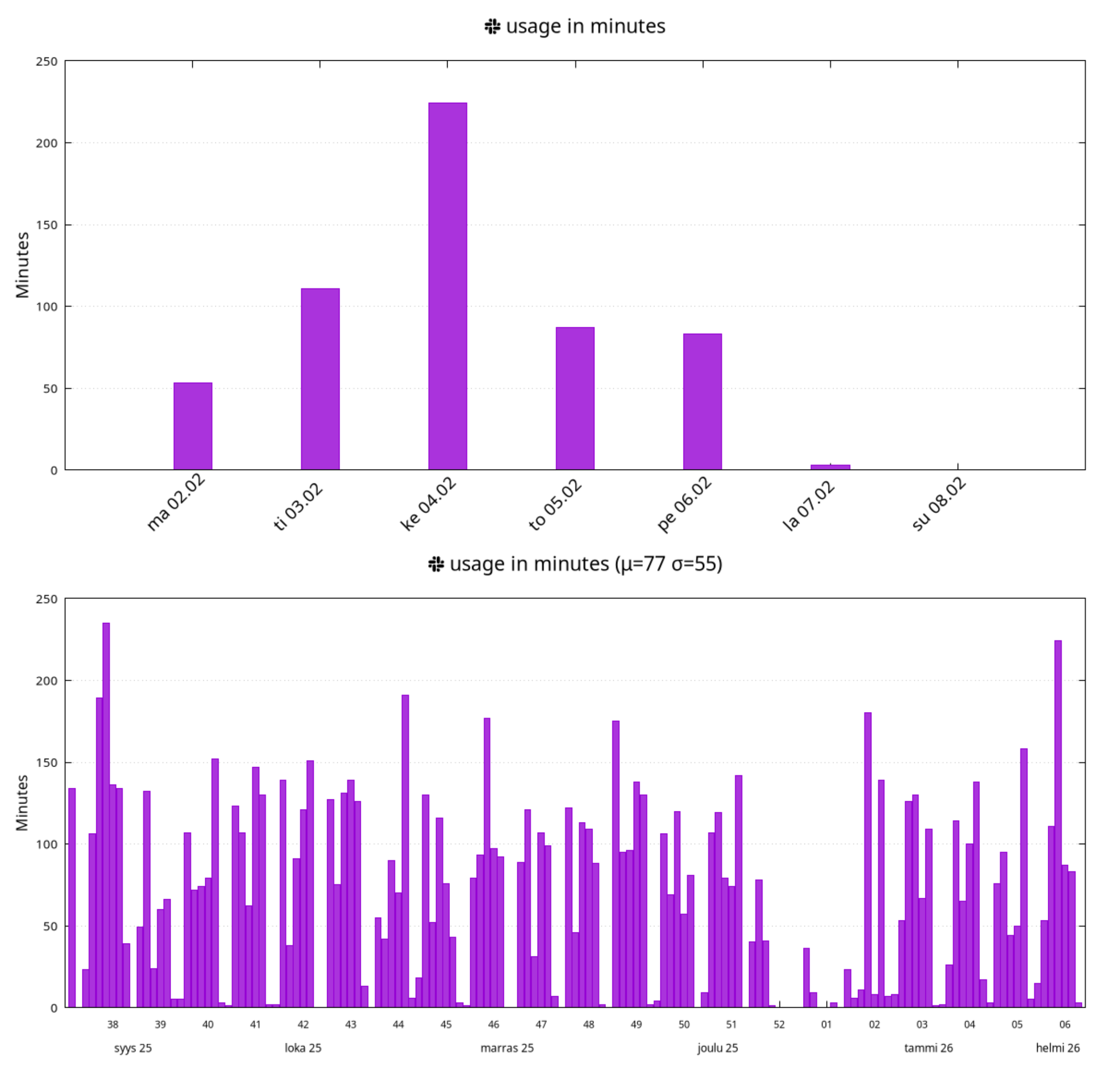
While I don’t have the data from before I started using this self-shaming technique, it seems I am at around a 77 minutes per workday average with rather substantial swings.
Given that is actual time spent on Slack (not just uptime) it seems excessive. Or maybe intuitively, 1 h / workday oughta be sufficient.
More powerful shaming methods may be required.